Skip to content
Features

Every feature, and how to use it well.

Each card carries a Tip: the small habit that makes that feature pay off.

Scan any receipt

Photograph a printed receipt, or import a marketplace screenshot, PDF or emailed order confirmation. ItemLogue reads every item, price, tax and date, then hands you a review screen instead of a blank form.

Tip · Scan right after checkout while the receipt is crisp, since thermal paper fades within weeks. Receipt came by email? Open it, tap Print, then share from the print dialog.
No receipt? Photograph the haul

Bought a lot with no itemized receipt? Lay it out, take a few photos, and ItemLogue identifies what it sees. Each item comes back ready to price and save. Selling the lot as a lot? Turn off Detect separate items and each photo becomes one listing for the whole bundle.

Tip · Fit several items in one photo, flat with a little space between them, in good light. These photos build your inventory fast; add a clean photo of each item later for its listing.

Inventory that stays tidy

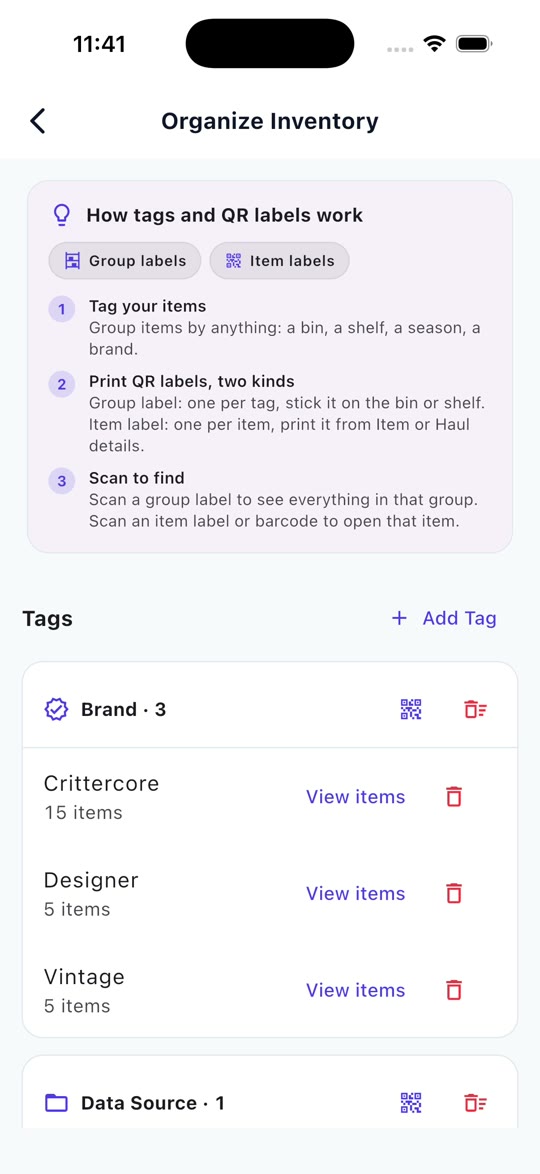
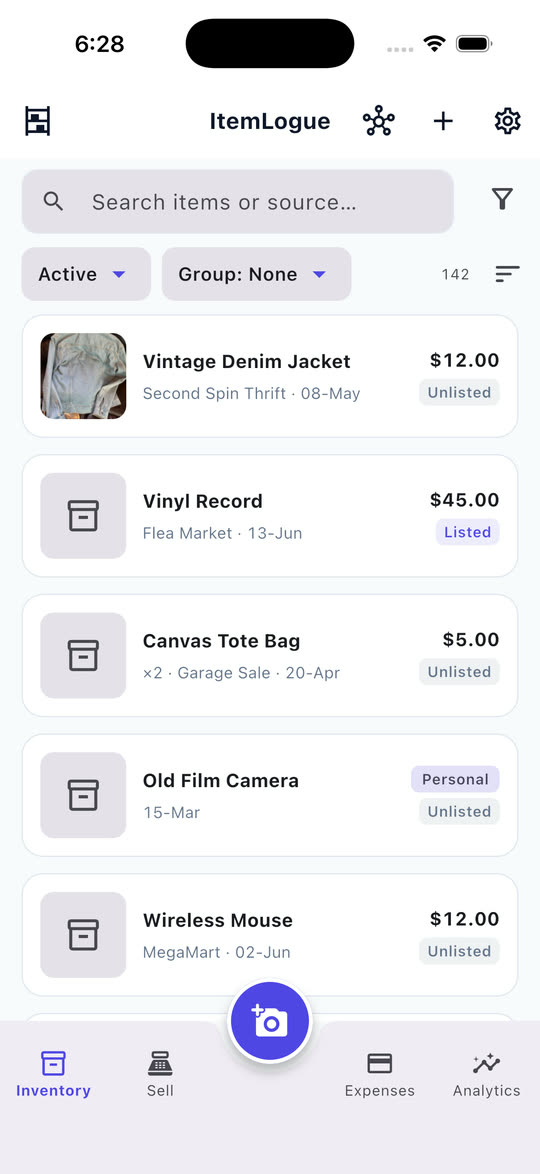
Every item in one list with its cost, condition, status, photos and tags. Filter by status, type or tag, group by haul, category or tag, and sort how you think. Personal items sit in the same list, kept out of your business numbers.

Tip · Tag items with where they physically live, like Storage: Bin A, so you can find the real thing when it sells.

Scan a label, find the real thing

Print a QR label for any item or storage bin. Scan an item to jump straight to its detail, or scan a bin to see everything inside it. When a sale comes in you find the physical item in seconds instead of digging.

Tip · Label your bins first. Scanning a bin turns a shelf into a searchable drawer, and item labels earn their keep once your inventory outgrows memory.

In-app Photo Studio

Turn quick thrift photos into clean marketplace images right inside ItemLogue. Isolate items, swap backgrounds to pure white or neutral tones, add a natural contact shadow, and pad to a 1:1 square ready for marketplace grids.

Tip · Take your shot against any neutral surface with decent light. The cutout tool isolates the subject and places it on a crisp backdrop in seconds.

Comparable active price checks

See what similar items are listed for on eBay and Etsy while drafting your listing. Check active comps side-by-side to price with confidence.

Tip · Check active comps before confirming your listing price. Seeing active price ranges helps you stay competitive.

Draft listings from your photo

Open an item and tap List. The title starts from the item’s name, and ItemLogue writes the description and key item specifics from the photo. For eBay, category and item details are filled in for your review before publishing. Cross-posting elsewhere? Copy the details across in seconds.

Tip · Review the drafted specifics and adjust condition details before tapping publish. Everything is fully editable.

List and sync with eBay

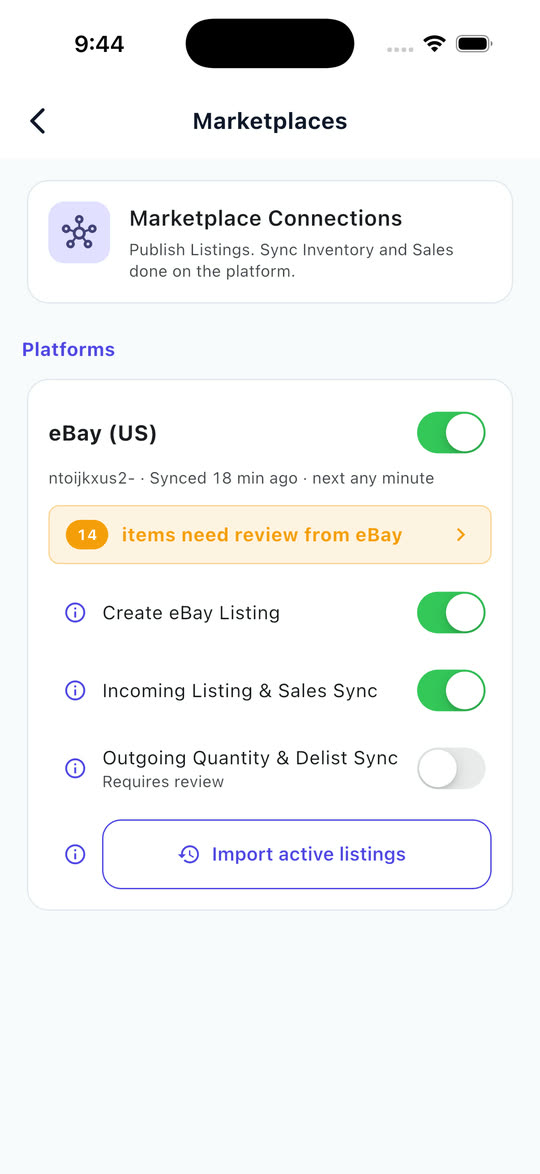
Connect your eBay seller account and publish items straight from ItemLogue. Your existing eBay listings and sales come in to Review, sales match the items they belong to, and profit updates once accepted. A listing made here is a normal eBay listing you can still edit on eBay.

How the eBay connection works

Tip · Set up your eBay business policies (shipping, payment, returns) before your first listing. ItemLogue uses them automatically on the List screen.

True cost, worked out for you

Shipping, platform fees, discounts and tax rarely belong to one item. ItemLogue spreads them proportionally across the haul, so every item carries its real landed cost basis.

Tip · Enter shipping and fees on the haul, not per item. Tick the untaxed lines exempt and the tax is distributed across the ones that owe it.

Never miss a return window

Set a return deadline on an item and ItemLogue watches it for you. One quiet reminder lands before anything still returnable runs out of time.

Tip · Turn on return alerts in Settings. ItemLogue nudges you once a day, and only when something genuinely needs attention.

Record sales in seconds

Single sales or multi-item bundles on any marketplace, with fees and shipping deducted and real profit shown the moment you confirm. eBay sales arrive in Review ready to accept. Got a sale confirmation as a screenshot or PDF? Share it into ItemLogue and the details fill in.

Tip · Bundling items from different hauls into one sale? Go ahead. ItemLogue keeps each item’s own cost basis straight.

Know where you stand

A clear Analytics dashboard showing profit, revenue, expenses and personal sales for any date range, with insights on your best sources, platforms and categories.

Tip · Glance at the P&L dashboard monthly to see which sourcing trips paid off and which ones didn’t.

Your data, no lock-in

Already tracking in a spreadsheet or another app? Bring its CSV export in and ItemLogue matches the columns for you (Pro). Want it back out? Export everything, anytime. Your records stay yours.

Tip · Import your existing records once on day one and pick up exactly where you left off.

Buy and sell in any currency

Source abroad, sell at home. Enter the exchange rate on each purchase and each sale and ItemLogue freezes it there, so a later swing never quietly rewrites your past profit.

Tip · Enter the FX rate when prompted. It stays with that haul, so your history holds no matter how rates move.

Year-end, already organized

One download at year end: a tidy pack of the year’s records, split into clean sheets for sales, purchases, returns, expenses, a per-platform summary and a profit summary, plus your inventory at the start and end of the year. Everything your accountant asks for, in one place.

Tip · Download the year-end pack instead of rebuilding your books by hand. It’s assembled the moment you need it.

In action

Watch it, feature by feature.

Short screen recordings. No sign-up, no sound needed.

Photograph a haul, skip the typing

One photo of the pile. Every item comes back named, ready to price and save.

List on eBay from one screen

Title, price check and item details filled in from your photo. Publish to eBay.

Clean backdrops on your phone

Isolate the item, swap to clean studio backdrops, and pad to a square frame.

Sort and filter how you think

Sort and filter how you think

Group by haul, category or tag, filter by status, then sort to match.

Record a sale, see the profit

Find the item, enter the price, and see the profit before you record it. Bundles split across every item.

Delist the moment it sells elsewhere

Record a sale and ItemLogue reminds you to pull the item from everywhere else it’s listed.

Never eat a missed return

Every return window counts itself down, and nudges you before it closes.

Log business expenses from a receipt

Snap a supplies receipt and it lands in your books, apart from item costs.

See your real profit & P&L

Profit, revenue and expenses, plus insights on your best sources and platforms.

Print & scan your own labels

Print labels for a whole haul, tag them to a bin, and find any bin in seconds. Scan a label to jump straight there.

More demos (3)
Connect eBay, stay in sync

Connect eBay, stay in sync

Your eBay listings and sales come in for review, and quantities can follow sales made elsewhere.

Tag and filter your way

Tag and filter your way

Tag items by bin, season or whatever you actually search by, then scan a label to find them.

Import a spreadsheet, export anytime

CSV in, CSV out. Your records stay yours.

Ready to put it to work?

Download ItemLogue and run your next haul through it, start to finish.

Most features free · iOS & Android · No card required