List on eBay, and keep it in sync, from your phone.
Connect your eBay seller account and ItemLogue lists your items, brings your eBay listings and sales in, and keeps quantities in step both ways. You stay in control: anything that changes your inventory waits for your OK.
What connecting does
-
Tap Marketplaces
It’s the little hub icon at the top of the app, on every tab.
-
Turn on eBay (US)
Sign in to eBay and you’re connected. You’ll need a US eBay seller account, with your shipping, payment and return policies already set up on eBay.
-
Review what comes in
Your active eBay listings show up in Review. Add them as new items, or link them to items you already have so nothing’s doubled up.
After that it keeps itself up to date, checking eBay every few minutes. If you see a red dot on Marketplaces, something’s waiting for you in Review.
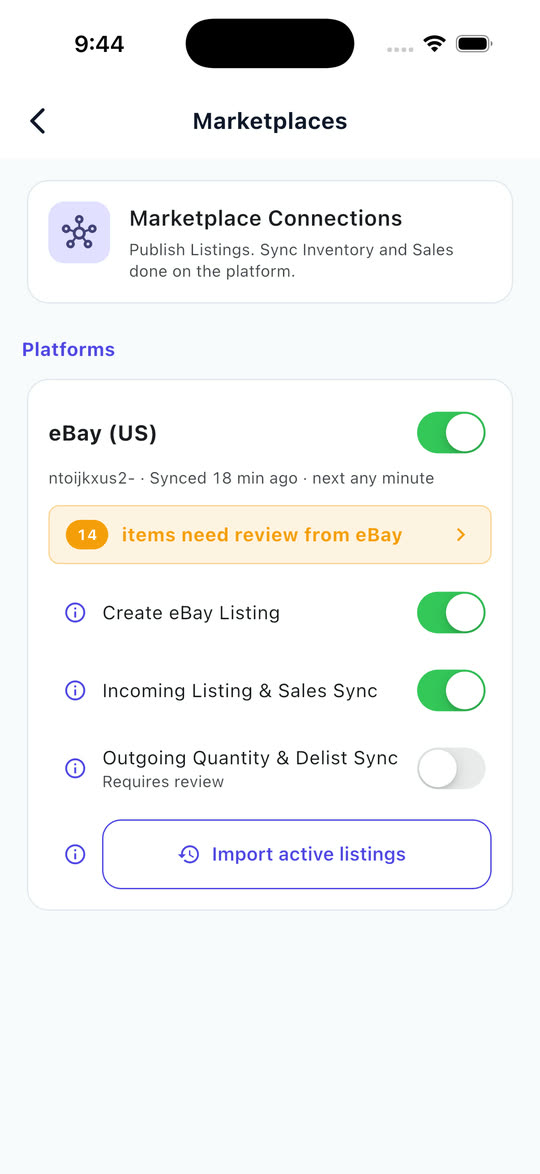
Four controls, each with one job.
Turn on what you want ItemLogue to handle. Leave the rest off and do it yourself.
Create eBay Listing
Turn this on and eBay shows up when you open an item and tap List, so you can publish it to eBay right there. Every plan can list. On the free plan, publishing uses your monthly Smart Capture allowance.
Incoming Listing & Sales Sync
This is what keeps ItemLogue up to date with eBay. New listings and sales from the time you connected come in, along with price and quantity changes you make on eBay. Turn it off and nothing comes in. It’s free on the free plan for a limited time, and included with Pro.
Outgoing Quantity & Delist Sync
Sold something on Poshmark, edited a quantity, or had a return? With this on, ItemLogue updates the quantity on eBay for you, so you don’t sell the same thing twice. It still asks before ending a listing. With it off, each change waits in Review for your OK. Included with Pro.
Import active listings
When you connect, your latest eBay listings come in on any plan. Got older listings you want too? On Pro, pick a date range and bring those in as well.
Two-way sync, in plain words
What comes in from eBay: your new listings, your sales with eBay’s real fees, any price or quantity you change on eBay, and listings that end there.
What goes out to eBay: the listings you publish, the price updates you send, and, if you’ve turned on Outgoing sync, the new quantity when something sells somewhere else or you change the count.
Why some things wait: ItemLogue won’t add to your inventory behind your back. That new eBay listing might be an item you already have, and that sale might be one you already recorded by hand. So they wait in Review, where you add them, link them, or dismiss them, and nothing gets counted twice.
One more thing: items that came over from eBay don’t know what you paid for them. Add the cost on the Add costs screen and their sales start counting toward your profit.
What happens when something changes.
Some things just happen. Anything that would change your inventory waits for you.
| When | What happens |
|---|---|
| You change the price on eBay | ItemLogue picks up the new price on its own. |
| A listing ends on eBay | ItemLogue marks it ended on its own. |
| You list something new on eBay | It waits in Review. Add it as an item, link it to one you already have, or dismiss it. |
| Something sells on eBay | It waits in Review with eBay’s real fees filled in. Accept it and the sale and your profit are recorded. |
| You change the quantity on eBay | It waits in Review. Accept to match eBay’s count, or dismiss to keep yours. |
| You sell it on Poshmark, or edit its quantity in ItemLogue | With Outgoing sync on, ItemLogue updates the quantity on eBay for you. With it off, the change waits in Review for your OK. |
| The last one sells somewhere else | ItemLogue always asks before it ends the eBay listing. |
| You change the price in ItemLogue | Nothing changes on eBay until you tap Update price. |
| You want a new title, description or photos | Edit them on eBay any time. It’s a normal eBay listing. |
Good to know
- US eBay only for now.
- Sales sync from the time you connected. Earlier sales aren’t imported.
- A listing made in ItemLogue is a normal eBay listing. Edit it on eBay’s website or app any time.
- Deleting an item that’s live on eBay asks first: delete it from ItemLogue and keep the listing, or end the listing first.
- Relisting on eBay creates a new listing. Link it to your item in Review.
- Listings with variations (sizes or colors in one listing) aren’t supported yet.
- Disconnecting stops syncing. Your eBay listings and recorded sales stay in ItemLogue.
Listed somewhere without a connection, like Poshmark or Mercari? Track it on the List screen and ItemLogue reminds you to delist there when it sells. See every feature or the FAQ.
Most of ItemLogue is free, including unlimited inventory, sales, profit and CSV export. What the plans cover.
Bring your eBay listings home.
Connect eBay (US), review what comes in, and list your next item from your phone.
Most features free · iOS & Android · No card required